
How to Make Custom Presets in After Effects
Creating custom presets in Adobe After Effects is straightforward and requires no coding knowledge.
Hold Shift, select all the keyframes, effects, and properties you want to turn into a preset. Then click the Create New Animation Preset icon in the Effects & Presets panel. Give it a name and that's it!
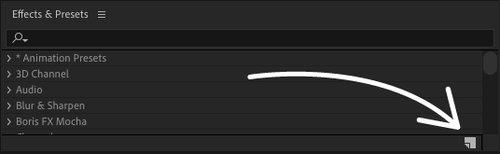
After Effects automatically saves presets as .ffx files, which can then be applied to selected layers. When applied, all the keyframes, effects, and expressions will be applied to the selected layer. The keyframes will be applied relative to where the Current Time Indicator is within the comp.
What You Can Preset
- Keyframes
- Effects
- Expressions
- Any combination of the above
Presets can even create shape layers, like our Bounding Box tool.
When to Use Presets
Use presets when you find yourself repeatedly:
- Copying and pasting the same keyframes
- Applying the same effect combinations
- Writing the same expressions
- Developing shareable tools for other After Effects users
If you create a cool preset, you can even share it on Gumroad.